
JSON Pretty — Powerful Online Formatter, Editor & Validator
JSON Pretty is a Chrome extension that formats raw JSON responses right in your browser — backed by a powerful online editor for validating, editing, and navigating complex JSON data.
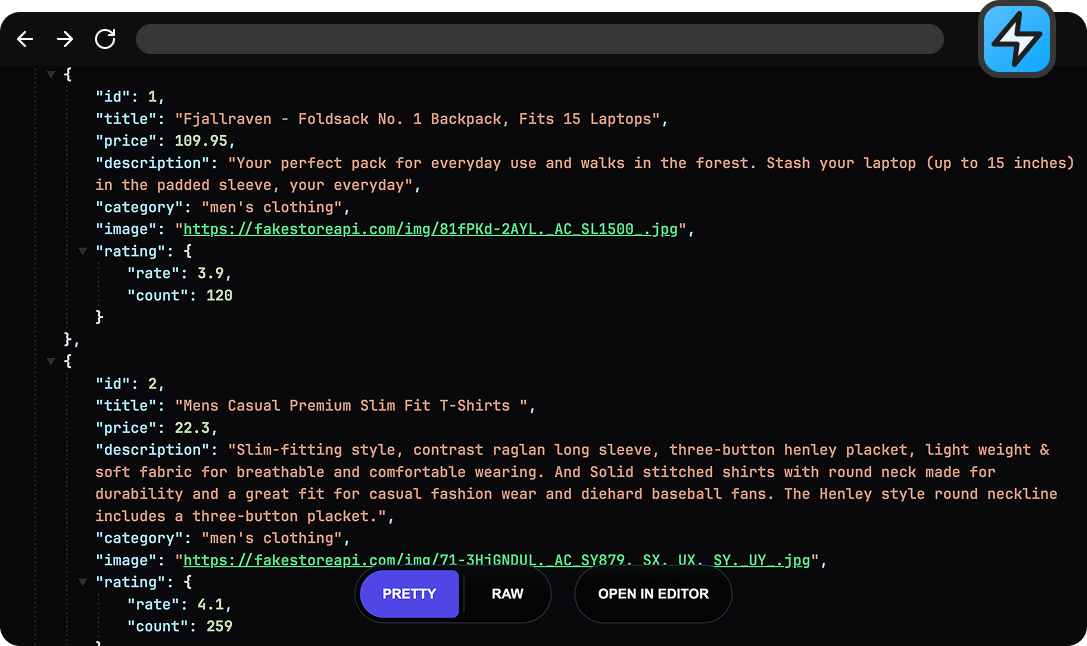
What is JSON Pretty?
Two parts of one workflow — formatting that catches you in the browser, an editor that takes over when you need more.
Catches every JSON response
The Chrome extension formats every JSON response your browser opens — collapsible nodes and a raw-to-pretty toggle right inside the tab.
One click to the editor
When you want to do more than read, one click opens the same response in a full editor — already formatted, ready for changes.
A full JSON editor
Paste, upload a JSON file, or open the editor directly. Syntax errors are flagged inline, deep nesting collapses into a tree view, search and copy-by-path are one keystroke away.
Stays in your browser
Parsing, formatting, validating, editing — all of it runs locally. Your JSON never reaches a server, never gets logged, never leaves your machine.
JSON Pretty Features
Everything JSON Pretty does, in one workflow — from automatic formatting in the tab to a full editor with inline validation.
Instant JSON Formatter
Any JSON response opens formatted right in your browser tab — automatic, instant, no extra step. Collapse nested blocks, flip between raw and pretty views, or send the response to the JSON editor with one click.
{"user":"alice","active":true,"roles":["admin","editor"],"meta":{"createdAt":"2026-01-15","lastLogin":null,"score":99.5}}{
"user": "alice",
"active": true,
"roles": ["admin", "editor"],
"meta": {
"createdAt": "2026-01-15",
"lastLogin": null,
"score": 99.5
}
}Inline JSON Validator
Invalid JSON is flagged the moment you paste or type it. The validator pinpoints the exact line and shows the broken fragment in context.
Full JSON Editor
Syntax highlighting, fold and unfold for nested structures, JSON-aware search, and copy-by-path on any node.
Work with JSON Files
Upload a JSON file straight into the editor. Parsing happens off the main thread — multi-megabyte payloads stay responsive.
Private and Secure
Parsing, formatting, validating, editing — all of it runs locally. Your JSON never reaches a server.
How to format JSON with JSON Pretty
Three steps from raw to readable — install once, then it's all automatic.
'/%3e%3ccircle%20cx='24'%20cy='24'%20r='9.5'%20style='fill:%231a73e8'/%3e%3cpath%20d='M34.3913,30.0029,24.0007,48A23.994,23.994,0,0,0,44.78,12.0031H23.9989l-.0025.0093A11.985,11.985,0,0,1,34.3913,30.0029Z'%20style='fill:url(%23b)'/%3e%3cpath%20d='M13.6086,30.0031,3.218,12.006A23.994,23.994,0,0,0,24.0025,48L34.3931,30.0029l-.0067-.0068a11.9852,11.9852,0,0,1-20.7778.007Z'%20style='fill:url(%23c)'/%3e%3c/svg%3e)
Install the Chrome extension
Add JSON Pretty from the Chrome Web Store. Nothing else to set up.
Open any JSON URL
Every JSON response in your browser is formatted automatically the moment it loads.
Open in the editor
One click hands the same JSON to the editor for editing, search, and copy-by-path.
How JSON Pretty compares to a typical online JSON formatter
Most online JSON formatters are a single paste-box. JSON Pretty is built for the way you actually work with JSON in a browser.
A typical online JSON formatter
- A single paste-box on a webpage — copy, paste, click, repeat
- No bridge between the browser tab and the editor
- Plain text output, no syntax highlighting, no folding
- Scroll the whole document to grab a single value
- Chokes on multi-megabyte JSON files
- Your data usually travels through their server

JSON Pretty
- Auto-formats JSON the moment it loads in any browser tab
- Seamless one-click handoff from the tab straight into the editor
- Syntax highlighting with collapsible nodes for deeply nested structures
- Copy any node — or just its value — in a single click
- Multi-megabyte JSON files load without freezing the page
- Nothing uploaded, nothing logged, nothing leaves your browser
Frequently asked questions
A JSON formatter takes raw or minified JSON and reformats it with consistent indentation and line breaks, so it's actually readable by eye. The data itself doesn't change — only the whitespace does. JSON Pretty also lints the input as it formats, so syntax errors get flagged before they reach your code.
Two ways. With the Chrome extension installed, every JSON response in your browser is formatted automatically the moment it loads. Or open the editor directly: paste your data, upload a JSON file, and it's formatted on arrival.
Yes — that's what the JSON editor is for. Paste your data or upload a JSON file, and you get syntax highlighting, fold and unfold for nested structures, JSON-aware search, and inline validation. Edits stay on your machine — nothing is uploaded to a server.
The JSON validator runs as you type or paste. When the input isn't valid, the exact line of the syntax error is highlighted and a snippet of the broken fragment is shown right above the editor, so you can locate the problem without scanning the whole document.
A JSON viewer is for reading — it renders the data in a structured layout you can browse and collapse. A JSON formatter focuses on producing clean, readable text output from raw or minified input. JSON Pretty does both: the Chrome extension viewer lets you collapse and toggle raw/pretty inside the tab, while the editor formats your JSON and lets you change it in place.
Yes. The editor parses and validates files off the main thread, so even multi-megabyte JSON files stay responsive. Upload from the toolbar and the document is ready to read, fold, search, or edit as soon as parsing finishes.
A typical online JSON formatter is one paste-box on a webpage — copy, paste, click. JSON Pretty splits the work between the Chrome extension and the editor: the extension formats JSON automatically in any browser tab, and one click hands the same response to the editor for editing, searching, and copying by path. No more bouncing between tabs.
Yes. Parsing, formatting, validation, and editing all happen locally in your browser. JSON Pretty doesn't send your data to a server, doesn't log it, and doesn't store it anywhere outside your machine.
Ready to start?
A modern JSON workflow without friction — every response formatted on arrival, and a full editor just one click away.
Add to Chrome{
"user": "alice",
"active": true,
"roles": ["admin", "editor"],
"meta": {
"createdAt": "2026-01-15",
"lastLogin": null,
"score": 99.5
}
}